In 2026, Swiggy Instamart represents one of the largest quick-commerce supply networks in urban India, fulfilling millions of 10-to-15 minute grocery deliveries every single day. Operating from specialized micro-fulfillment centers known as Pods or Instamart Dark Stores, delivery executives enjoy steady order flow, predictable short-distance runs, and structured milestone incentives. However, when a rider changes residence or finds that an adjacent Instamart Pod offers higher order density, knowing how to execute a swiggy instamart store change is critical to maintaining daily earning efficiency.
Unlike traditional restaurant food delivery where riders roam dynamically across broad city zones, Instamart operations are localized around dedicated store pods. Your shift slots, floating cash limits, dispatch priority, and daily target bonuses are directly anchored to your assigned pod. Remaining mapped to an inconvenient or low-demand store increases commute fatigue and reduces the total number of orders you can complete within an 8-hour shift.
In this comprehensive 2026 partner guide, we break down the eligibility requirements, official in-app store change procedures, Pod Manager coordination protocols, and expert strategies to get your store transfer approved quickly.
Top Reasons Delivery Partners Request an Instamart Pod Transfer
Delivery executives commonly seek to switch their assigned Instamart store due to:
- Proximity to Residence: Reducing daily unpaid commute distances by working out of a pod within 2 km of home.
- Higher Order Density & Surge Incentives: Moving to high-capacity mega-pods located near affluent residential high-rises with continuous batch orders.
- Better Shift Availability: Certain 24×7 Instamart pods provide late-night and early-morning grocery slots with higher surge pay.
- Transitioning from Food Delivery to Instamart Pods: Switching from roaming restaurant food delivery to a dedicated grocery dark store pod.
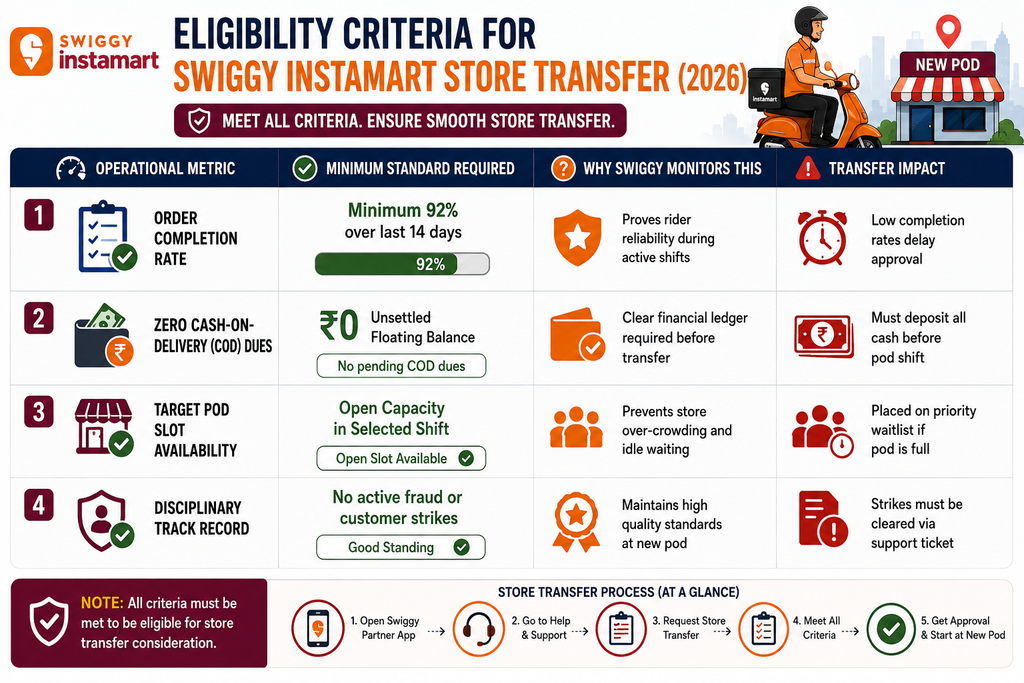
Eligibility Criteria for Swiggy Instamart Store Transfer (2026 Matrix)
> Looking for high-density grocery delivery jobs with structured milestone bonuses and flexible store locations? Explore active quick-commerce openings in your area today.
Step-by-Step Guide: How to Request an Instamart Store Change
Follow these 5 steps directly inside the Swiggy Delivery Partner Portal and rider app:
Step 1: Open the Swiggy Delivery Partner App Log in to your active partner app and ensure you are currently marked ‘Offline’ with no active delivery tasks.
Step 2: Navigate to ‘Help & Support’ (सहायता) Tap the profile icon, go to Help & Support > Shift and Zone Issues > Change My Primary Zone / Store Pod.
Step 3: Select Your Preferred Instamart Pod Location The in-app GPS selector will display all operational Instamart pods within your city along with real-time capacity indicators. Select your desired target store pod.
Step 4: State Reason for Transfer & Submit Ticket Select your primary reason (e.g., Address Relocation, Route Convenience, Shift Timing) and submit your formal transfer ticket.
Step 5: Pod Manager Verification & On-Ground Activation Once your ticket is approved digitally (typically within 24–48 hours), visit the new Instamart pod during morning reporting hours. The on-duty Pod Team Lead will verify your partner ID on the store dispatch system and assign your new shift roster.
Pro Tips to Get Your Pod Change Approved Faster
- Meet the Target Pod Manager in Person: Pod managers have visibility over upcoming fleet requirements. Introducing yourself and requesting an internal slot recommendation speeds up ticket processing.
- Request Transfers Early in the Week: Submit your transfer request on Monday or Tuesday rather than Friday evening when weekend rostering is already locked.
- Maintain Perfect Attendance During Notice: Consistently logging in on time at your current pod demonstrates reliability, making managers enthusiastic to endorse your transfer.
Frequently Asked Questions (FAQs)
How long does a Swiggy Instamart store transfer take to reflect in the app?
Standard pod change requests are processed within 24 to 48 hours. Once approved, your new store pod will appear as your primary pickup hotspot in the app.
Can I work simultaneously for food delivery and Instamart from the same app?
Yes. Swiggy’s unified delivery partner ecosystem allows flexible switching between grocery pod shifts and open food delivery zones depending on city configurations.
Will changing my Instamart store reset my weekly incentive targets?
No. Your cumulative order milestones and weekly incentive progress remain intact across the Monday-to-Sunday payout cycle.
Can I request a transfer to an Instamart pod in another city?
Yes. For inter-city relocation, choose ‘City Change’ in the help section and provide local address proof for the new city.
> Join top quick-commerce grocery delivery fleets with guaranteed order density and high weekly earnings. Submit your quick application to secure your preferred pod today.
Conclusion
Aligning your delivery shifts with the right Swiggy Instamart pod is the smartest way to minimize idle time, maximize daily order volume, and protect your vehicle fuel efficiency. By following official in-app procedures and coordinating with your local store lead, you can ensure a smooth, profitable pod transition.