In the rapidly expanding gig economy of 2026, working as a food and grocery delivery partner is one of the most flexible and reliable ways to generate an independent income. As the digital infrastructure of India has matured, platforms like Swiggy have completely transformed how millions of people order meals and daily essentials. Despite the massive adoption of UPI and digital wallets, a massive segment of the Indian consumer base still strongly prefers the traditional Cash-on-Delivery (COD) method. Whether it is an office employee ordering a quick afternoon lunch or a family ordering a weekend dinner, physical cash remains a cornerstone of the food delivery ecosystem.
However, for a Swiggy delivery partner, handling physical cash introduces a critical set of operational rules. You are not just delivering food; you are effectively acting as a mobile cash collection point for the platform. The most important operational rule that every Swiggy rider must master is the Swiggy cash on delivery limit. Failing to understand the Maximum COD wallet limit can result in your delivery ID being temporarily blocked, which completely halts your order flow and causes you to lose out on high surge pay and weekly incentives.
In this comprehensive, deep-dive guide, we will explore everything you need to know about Swiggy’s floating cash rules. We will break down exactly what the Swiggy Cash on Delivery Limit: Deposit Rules & Wallet Balance entails, why the company strictly enforces it, what happens when you hit the red zone, and how you can seamlessly apply for a delivery job today using our completely document-free onboarding process.
What is Floating Cash and the Swiggy Cash on Delivery Limit?
To successfully navigate the Swiggy Delivery Partner App, you must first understand the financial mechanics behind a Cash-on-Delivery (COD) order.
When a customer places a COD order on the Swiggy app, Swiggy has already compensated the restaurant partner for the preparation of that food. Therefore, the physical cash that the customer hands over to you at the doorstep does not belong to you—it belongs to Swiggy.
Because you are holding the company’s money in your physical pocket, you are effectively in “debt” to the platform for that exact amount. The total accumulated amount of physical cash you have collected from various customers throughout your shift—which you have not yet deposited back to the company—is referred to as your “Floating Cash” or “Wallet Balance.”
The Swiggy cash on delivery limit is the absolute maximum threshold of physical cash that the app allows you to hold at any given time. Once your collected cash reaches this predetermined ceiling, the algorithm automatically triggers a restriction on your account. You will be prevented from taking any new orders until you clear your pending dues and bring your wallet balance back down to zero.
> If you’re exploring delivery work, check current delivery jobs and find an opportunity that fits your preferred location and schedule.
Why Does Swiggy Enforce a Maximum COD Wallet Limit?
You might wonder why a massive logistics and tech platform cares if a delivery partner holds a few thousand rupees for a couple of days. The implementation of strict deposit rules is not designed to frustrate riders. Instead, the Maximum COD wallet limit serves as a vital safeguard that protects both the rider and the company’s financial ecosystem. Here are the core reasons why these limits are heavily enforced in 2026:
1. Rider Safety and Physical Security
The most critical reason for the Swiggy cash on delivery limit is your personal safety on the road. Delivery partners work long hours, navigating heavy city traffic, and often delivering to isolated residential areas late at night. If there were no strict collection limits, a rider working a busy weekend shift could easily accumulate ₹5,000 to ₹10,000 in physical cash. Carrying large amounts of money makes riders vulnerable to theft, muggings, or accidental misplacement. By forcing riders to digitally deposit the cash once it hits a relatively low ceiling, Swiggy ensures that its fleet is never carrying dangerously large sums of money.
2. Streamlined Restaurant Settlements
Swiggy processes millions of orders daily, and it must settle payments with its thousands of restaurant partners consistently. If millions of rupees in COD payments are sitting in the physical pockets of delivery riders for weeks on end, it drastically disrupts the company’s operational cash flow. By enforcing swift deposit rules, the platform ensures that money circulates quickly from the customer to the digital banking ecosystem, allowing restaurants to be paid on time.
3. Fraud Mitigation
In an operation involving hundreds of thousands of independent gig workers, fraud prevention is a massive logistical challenge. Without a Maximum COD wallet limit, a small percentage of bad actors could potentially collect massive amounts of COD money over a weekend, delete the delivery app, and abscond with the company’s funds. The limit acts as a strict, automated financial safeguard, keeping the company’s risk exposure incredibly low.
How Much is the Maximum COD Wallet Limit in 2026?
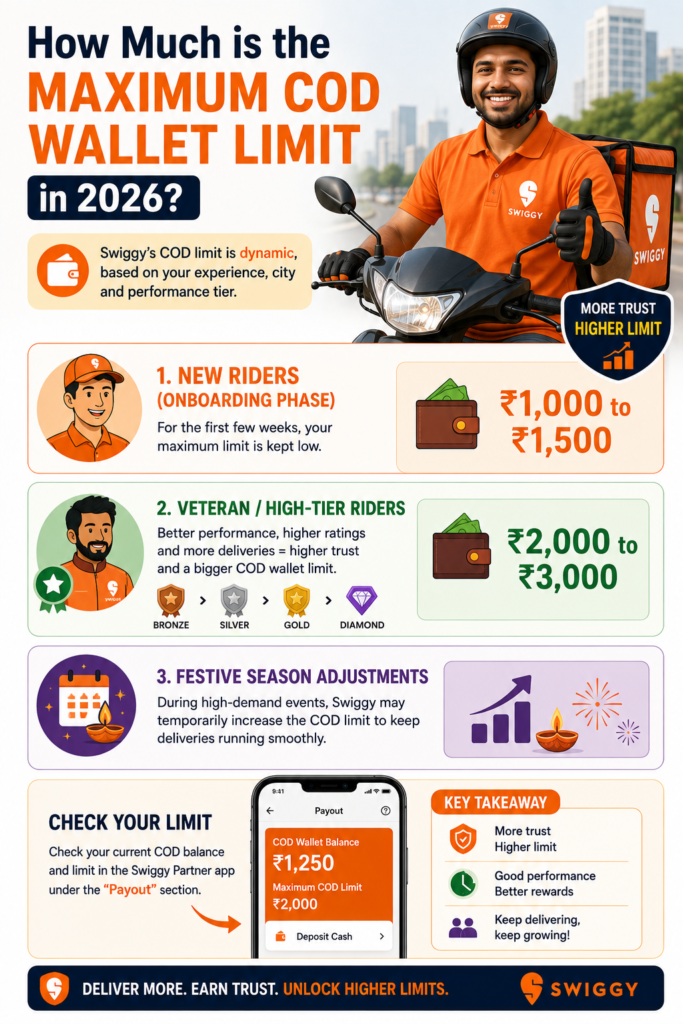
One of the most frequent questions asked by new delivery partners is, “What is the exact cash limit before my ID gets blocked?” In 2026, the Swiggy cash on delivery limit is not a static number applied identically to everyone. Swiggy utilizes a dynamic algorithm to determine your specific floating cash limit based on a variety of factors, including your experience on the platform, your city, and your performance tier.
- New Riders (The Onboarding Phase): When you first join the Swiggy fleet, your trust score is still being established. For the first few weeks, your maximum limit is kept relatively low, generally hovering around ₹1,000 to ₹1,500.
- Veteran / High-Tier Riders: As you complete more deliveries, maintain a high order acceptance rate, and receive positive customer ratings, you level up in Swiggy’s rider tier system (e.g., Bronze, Silver, Gold, Diamond). Highly rated, experienced riders are rewarded with higher trust scores and a much larger Maximum COD wallet limit, which often ranges between ₹2,000 and ₹3,000.
- Festive Season Adjustments: During massive high-demand events like the IPL finals, Diwali, or New Year’s Eve, order volumes skyrocket. To prevent riders from being repeatedly blocked during the busiest hours of the year, the system may temporarily expand the floating cash limit to ensure uninterrupted, smooth operations.
Strategic Tip: You can easily monitor your live floating cash balance and your specific hard limit by navigating to the “Wallet” or “Floating Cash” tab inside your Swiggy Delivery Partner App.
The Consequences: What Happens if You Exceed the Limit?
Managing your floating cash is a mandatory skill if you want to maximize your daily income. If you fail to monitor your wallet balance and hit your specific Maximum COD wallet limit, the system’s reaction is automated and immediate.
1. Temporary ID Block (The Paused Screen)
The exact moment your floating cash balance crosses your permissible limit, your Swiggy Delivery Partner App will display a restriction screen. You will not be able to receive any new order pings. Your ID is essentially paused or temporarily “blocked” from the delivery network until the cash is settled.
2. Missing Out on High Surge Pay
The real danger of hitting your Swiggy cash on delivery limit is the severe loss of earning time. If your ID gets blocked right in the middle of the highly profitable 8:00 PM to 10:00 PM dinner rush, every minute you spend trying to deposit the cash is money lost. You miss out on surge pricing, peak-hour multipliers, and your daily target incentives.
3. Restriction on COD Orders
In some scenarios, if you are very close to your limit (for example, you have collected ₹1,400 out of a ₹1,500 limit), the algorithm will smartly stop assigning you Cash-on-Delivery orders. You will only receive prepaid orders where the customer has already paid online. However, if the absolute limit is fully breached, all orders will stop entirely.
Deposit Rules: How to Clear Your Swiggy Wallet Balance Fast
To keep your ID active and your earning momentum high, you need to know exactly how to clear your floating cash instantly. Over the years, the process has transitioned to be entirely digital, secure, and incredibly fast. Here is a step-by-step guide to clearing your balance:
Step 1: Access the Wallet Section
Open your Swiggy Delivery Partner App and navigate to the “Floating Cash” or “Deposit” section on your dashboard. Here, you will see exactly how much you owe Swiggy and what your maximum limit is.
Step 2: Choose the Deposit Amount
Click on the “Deposit Cash” button. The app gives you the flexibility to deposit the full pending amount or a partial amount.
(Strategic Tip: If your limit is ₹2,000 and you owe ₹1,900, you do not have to deposit the full ₹1,900. You can simply deposit ₹1,000 to bring your balance down to a safe ₹900, allowing you to keep some physical cash in your pocket for petrol or personal meals).
Step 3: Select Your UPI Method
In 2026, UPI (Unified Payments Interface) is the sole recommended way to clear your floating cash. The Swiggy app is seamlessly integrated with all major UPI platforms.
- Select UPI as your payment method.
- Choose your preferred app (Google Pay, PhonePe, Paytm, or Amazon Pay).
- The app will redirect you to your chosen UPI platform with the exact deposit amount automatically filled in.
Step 4: Authorize the Transaction
Enter your secure UPI PIN to authorize the payment. The money will be instantly deducted from your personal bank account and credited to Swiggy’s digital ledger.
Step 5: Instant ID Reactivation
Because UPI transactions are instantaneous, the Swiggy system updates your floating cash balance within 5 seconds. If your ID was paused, the restriction screen will immediately disappear, and you will start receiving new delivery pings instantly.
Pro-Tip: The Cash Exchange Hack
What happens if you have collected ₹2,000 in physical cash from customers, but your digital bank account is completely empty? You cannot perform a UPI transfer to clear your limit. In this common emergency, veteran riders use the “Cash Exchange” hack. They go to a trusted local grocery store, a tea stall, or a petrol pump, hand over the physical cash, and ask the shopkeeper to UPI the equivalent amount to their personal bank account. Once the money hits their digital account, they use the Swiggy app to clear the floating cash limit.
How to Apply for a Delivery Job Online (Document-Free Process)
If you are researching the Swiggy Cash on Delivery Limit: Deposit Rules & Wallet Balance because you are planning to join the platform and start earning, you are making a fantastic career choice. The gig economy offers unmatched flexibility and financial independence.
We have completely modernized the application process for joining delivery platforms. You do not need to upload any documents online! No scanning, no PDFs, and no complex forms that crash halfway through. Here is exactly how you can apply for a delivery job right now:
- Open the Application Form: Navigate to our job portal and click on the Delivery Partner Application Form.
- Enter Your Details: Simply type in your full Name, your active Mobile Number, and your City.
- Select Your Company: From the “Preferred Company” list, choose your desired platform (e.g., Swiggy, Zomato, Zepto, or Blinkit).
- Click Submit: Hit the Submit button.
That is the entire process! Once submitted, our dedicated onboarding support team will call you directly on your provided mobile number. They will guide you through the final simple verification process over the phone, answer any questions you have, and direct you to the nearest local city hub to collect your official delivery bag and t-shirt.
Looking for other job opportunities?
Aside from delivery roles, our portal features various other part-time and full-time jobs (such as retail sales, customer support, data entry, and office administration). Simply browse the portal, click ‘Apply Now’ on any job listing you like, enter your Name and Mobile Number, and click Submit. Our team will handle the rest!
> Ready to start delivery work? Apply as a delivery partner and explore flexible earning opportunities while managing your daily routine.
Frequently Asked Questions (FAQs)
Q1. Will my Swiggy ID be permanently terminated if I cross the Swiggy cash on delivery limit?
No, crossing the Maximum COD wallet limit will not result in a permanent ban or termination of your ID. It is merely a temporary, automated pause to prevent further cash accumulation. The exact moment you use the app to deposit the pending cash via UPI, your ID is instantly reactivated, and you can resume taking orders.
Q2. Can I deposit my physical cash directly at a physical Swiggy office?
In 2026, the entire floating cash deposit system is strictly digital to ensure maximum speed, efficiency, and transparency. You cannot go to a physical Swiggy office to hand over cash. You must use UPI, Net Banking, or a linked digital wallet to clear your balance.
Q3. Do the tips I receive from customers affect my Maximum COD wallet limit?
Absolutely not. If a customer gives you a ₹50 physical cash tip at the doorstep, that money is 100% yours. You do not need to report it to the app, and it does not affect your floating cash balance in any way. Only the exact bill amount of the official COD order is added to your floating cash ledger.
Q4. What if a customer wants to pay via UPI QR code instead of handing me physical cash?
If a customer chooses to scan a UPI QR code at their doorstep instead of paying in physical cash, that transaction goes directly to Swiggy’s digital servers. Because you did not physically touch or collect any cash, nothing is added to your Swiggy cash on delivery limit.
Q5. Can I proactively increase my Swiggy Cash on Delivery Limit?
Yes, your limit naturally increases based on your app performance. By maintaining a high delivery completion rate, achieving top customer ratings, and consistently clearing your floating cash promptly without letting your ID get blocked, the Swiggy algorithm will upgrade you to a higher performance tier, automatically granting you a much larger cas