The quick-commerce revolution has completely redefined the retail and logistics landscape across India. By 2026, receiving daily groceries, fresh produce, and household essentials within 10 to 15 minutes is no longer a luxury; it is a standard expectation. At the forefront of this rapid-delivery ecosystem is Swiggy Instamart. Operating through a massive network of hyper-local “Dark Stores” (mini-warehouses), Swiggy Instamart relies on an army of dedicated delivery partners to fulfill millions of orders every single day.
While the digital infrastructure in India has advanced tremendously, leading to a massive surge in UPI and wallet payments, physical cash refuses to step down. A remarkably large percentage of the Indian demographic—ranging from elderly customers who are not tech-savvy to college students managing their pocket money—still strongly prefers the Cash-on-Delivery (COD) method. For a delivery partner, this means that handling cash orders for grocery is an unavoidable and crucial part of the daily job.
However, dealing with physical cash in a highly digitized delivery network introduces a unique set of financial and operational responsibilities. To ensure that your delivery ID remains active and you do not miss out on high-earning peak hours, mastering the Swiggy Instamart COD deposit process is absolutely mandatory.
In this comprehensive, deep-dive article, we will thoroughly explore the Swiggy Instamart COD Deposit: Cash Collection & Wallet Guide. We will explain the financial mechanics of floating cash, detail exactly why Swiggy enforces strict cash limits, provide a step-by-step tutorial on how to deposit your collected cash, and share veteran strategies for flawlessly handling cash orders for grocery without slowing down your delivery speed.
The Financial Mechanics of Quick-Commerce: What is Floating Cash?
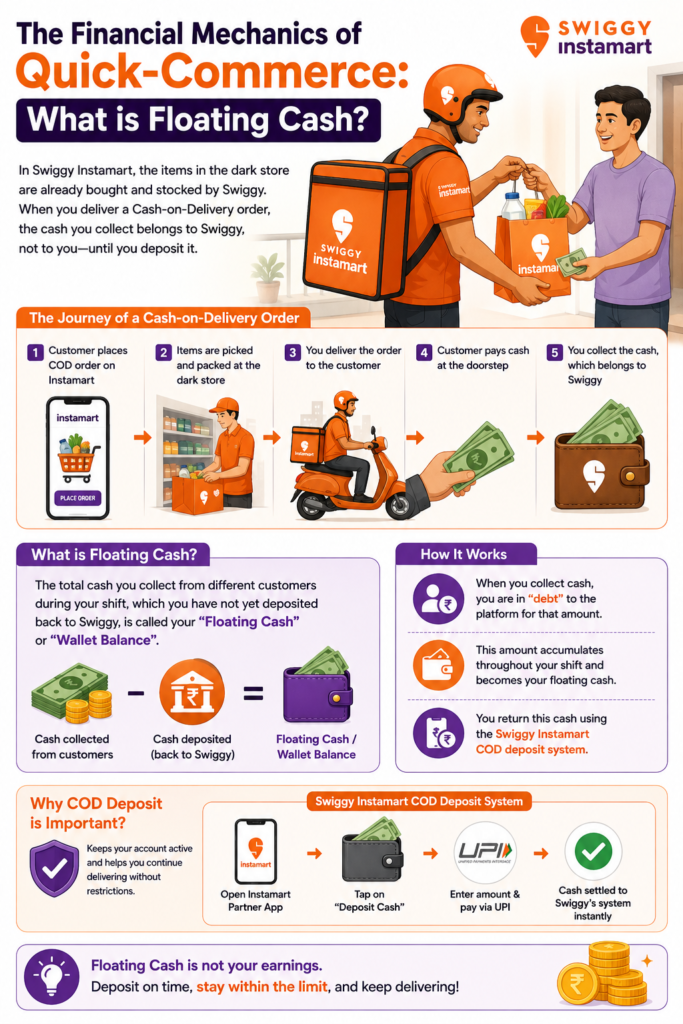
To truly master your daily gig economy operations, you must first understand the financial journey of a grocery order. Unlike traditional food delivery, where you pick up a cooked meal from an independent restaurant, Swiggy Instamart operates entirely on an inventory-led model. The items inside the dark store—whether it is a packet of milk, a bag of rice, or expensive electronics—have already been procured and stocked by Swiggy.
When a customer places a Cash-on-Delivery order on the Instamart app, the items are packed and handed to you. At this point, the physical inventory has left the warehouse, but the company has not yet received payment. When you arrive at the customer’s doorstep and hand over the groceries, the physical currency the customer hands you technically belongs to Swiggy, not to you.
Because you are holding the company’s money in your physical wallet, you are effectively in “debt” to the platform for that exact bill amount. In the gig economy, the total accumulated amount of physical cash you have collected from various customers throughout your shift—which you have not yet deposited back to the company—is known as your “Floating Cash” or “Wallet Balance.”
The Swiggy Instamart COD deposit system is the mechanism through which you return this floating cash to the company’s digital ledgers.
> Looking for delivery work? Explore available jobs and find opportunities that match your location, availability, and preferred working hours.
Why Swiggy Enforces Strict Limits on Cash Collection
You might wonder why a multi-billion dollar platform cares if a delivery partner holds onto a few thousand rupees for a couple of days. The implementation of a strict floating cash limit is not meant to harass riders; rather, it serves as a vital safeguard that protects both your physical safety and the company’s operational cash flow. Here are the core reasons why these limits are heavily enforced:
1. Rider Safety and Physical Security
The absolute most critical reason for enforcing a cash limit is the personal safety of the delivery partner. Riders work long hours, navigating heavy city traffic, and often delivering to isolated residential areas late at night. If there were no strict collection limits, a rider working a busy weekend shift could easily accumulate ₹5,000 to ₹10,000 in physical cash. Carrying large amounts of physical money makes riders highly vulnerable to theft, muggings, or accidental misplacement. By forcing riders to digitally clear their Swiggy Instamart COD deposit once it hits a relatively low ceiling, the company ensures that its fleet is never carrying dangerously large sums of money.
2. Streamlining Dark Store Operations
Swiggy Instamart is a highly capital-intensive business. The company has to pay lease rentals for thousands of dark stores, manage massive inventory costs, and pay FMCG distributors. If millions of rupees in COD payments are sitting in the physical pockets of delivery riders for weeks on end, it drastically disrupts the company’s operational liquid cash flow. By enforcing swift deposit rules, the platform ensures that money circulates quickly from the customer to the digital banking ecosystem.
3. Fraud Mitigation and Trust Building
In a massive logistical operation involving hundreds of thousands of independent gig workers across India, fraud prevention is a critical challenge. Without a floating cash limit, a small percentage of bad actors could potentially collect massive amounts of COD money over a weekend, delete the delivery app, and abscond with the company’s funds. The limit acts as a strict, automated financial safeguard, keeping the company’s risk exposure incredibly low and protecting the integrity of the platform.
The Dynamic Cash Limit: How Much Can You Hold?
In 2026, the maximum cash limit before your ID gets blocked is not a static, fixed number applied identically to everyone. Swiggy utilizes a dynamic algorithm to determine your specific floating cash limit based on a variety of factors:
- New Riders (The Onboarding Phase): When you first join the Swiggy Instamart fleet, your trust score is still being established. For the first few weeks, your maximum limit is kept relatively low to minimize risk, generally hovering around ₹1,000 to ₹1,500.
- Veteran / High-Performing Riders: As you complete more deliveries from your assigned dark store, maintain a high order acceptance rate, and adhere to the strict 10-minute delivery timelines, your trust score naturally increases. Highly rated, experienced riders are rewarded with a much larger cash limit, which often ranges between ₹2,000 and ₹3,500.
- Festive Season and Rain Adjustments: During massive high-demand events (like Diwali or Holi) or heavy monsoon rains, grocery order volumes skyrocket. To prevent riders from being repeatedly blocked during the busiest and most profitable hours, the system may temporarily expand the floating cash limit to ensure uninterrupted, smooth operations and faster delivery turnarounds.
What Happens When You Exceed the Cash Limit?
Managing your floating cash is a mandatory skill if you want to maximize your daily income. If you fail to monitor your wallet balance and hit your specific cash limit, the system’s reaction is automated and immediate.
- Temporary ID Block (The Paused Screen): The exact moment your floating cash balance crosses your permissible limit, your Swiggy Delivery Partner App will display a red restriction screen. You will not be able to receive any new order pings from the dark store. Your ID is essentially paused or temporarily “blocked” from the delivery network until the cash is settled.
- Missing Out on High Surge Pay: The real danger of hitting your cash limit is the severe loss of earning time. If your ID gets blocked right in the middle of a highly profitable morning grocery rush (7:00 AM to 11:00 AM), every minute you spend trying to deposit the cash is money lost. You miss out on surge pricing and daily milestone targets.
- Restriction to Prepaid Orders Only: In some dynamic scenarios, if you are very close to your limit (for example, you have collected ₹1,400 out of a ₹1,500 limit), the Swiggy algorithm will smartly stop assigning you Cash-on-Delivery orders. You will only receive prepaid orders where the customer has already paid online. However, if the absolute limit is fully breached, all orders will stop entirely.
Swiggy Instamart COD Deposit: Cash Collection & Wallet Guide (Step-by-Step)
To keep your ID active and your earning momentum high, you need to know exactly how to clear your floating cash instantly. The process is entirely digital, highly secure, and incredibly fast. Here is the definitive Swiggy Instamart COD Deposit: Cash Collection & Wallet Guide:
Step 1: Access the Wallet Section
Open your Swiggy Delivery Partner App. On your main dashboard, navigate to the “Wallet,” “Payouts,” or “Floating Cash” tab. Here, you will see a large numerical display indicating exactly how much you owe Swiggy, alongside a progress bar showing how close you are to your maximum limit.
Step 2: Choose the Deposit Amount
Click on the “Deposit Cash” or “Clear Dues” button. The app gives you the flexibility to deposit the full pending amount or a custom partial amount. (Strategic Tip: You do not always have to deposit the full amount. If your limit is ₹2,000 and you owe ₹1,900, you can choose to deposit just ₹1,000 to bring your balance down to a safe ₹900. This allows you to keep some physical cash in your pocket for immediate personal expenses like petrol or lunch).
Step 3: Select Your UPI Method
In 2026, UPI (Unified Payments Interface) is the sole recommended and fastest way to clear your floating cash. The Swiggy app is seamlessly integrated with all major UPI platforms.
- Select UPI as your payment method.
- Choose your preferred app (Google Pay, PhonePe, Paytm, or Amazon Pay).
- The app will instantly redirect you to your chosen UPI platform with the exact deposit amount automatically pre-filled.
Step 4: Authorize the Transaction
Enter your secure 4-digit or 6-digit UPI PIN to authorize the payment. The money will be instantly deducted from your personal bank account and credited to Swiggy’s digital ledger.
Step 5: Instant ID Reactivation
Because UPI transactions are essentially instantaneous, the Swiggy system updates your floating cash balance within 3 to 5 seconds. If your ID was paused, the restriction screen will immediately disappear, and you will start receiving new delivery pings from your dark store instantly.
Best Practices for Handling Cash Orders for Grocery
Quick-commerce is all about speed. You only have a few minutes to travel from the dark store to the customer’s doorstep. Handling cash orders for grocery can significantly slow you down if you are not prepared. When a customer hands you cash, you have to count it, verify its authenticity, and provide exact change—all while standing at the door holding heavy grocery bags.
To maintain your delivery speed and protect your earnings, implement these highly effective strategies for handling cash orders for grocery:
1. The Change Management Rule (Carry Chillar)
The biggest bottleneck in a COD grocery order is the lack of exact change. If a customer’s bill is ₹320 and they hand you a ₹500 note, you need to return ₹180. If you do not have exact change, you waste 5 to 10 minutes asking neighbors or running to a local shop. Before you start your shift, always ensure you have a “Change Pouch” containing at least ₹500 in various denominations (₹10, ₹20, ₹50, and ₹100 notes).
2. Master the Doorstep Digital UPI Option
Sometimes, customers select COD on the app but realize they do not have physical cash when you arrive. Do NOT let them send the money to your personal UPI ID or phone number. This is a massive compliance violation and can lead to immediate termination. Instead, open the Swiggy Partner App, select the active order, and generate the official “Customer UPI QR Code.” The customer scans this code from your phone, and the money goes directly to Swiggy. Because you did not collect physical cash, your floating cash limit remains unaffected.
3. Beware of Counterfeit Notes
While relatively rare in 2026, counterfeit notes still circulate. When a customer hands you a ₹500 note, take a brief moment to check its authenticity. Look for the security thread, the watermark, and the color-shifting ink. If you unknowingly accept a fake note, the bank will reject it, and that financial loss will come directly out of your own pocket.
4. The “Cash Exchange” Hack for Empty Bank Accounts
What happens if you have collected ₹2,000 in physical cash from customers, but your digital bank account is completely empty? You cannot perform a UPI transfer to clear your limit, and your ID is about to get blocked. In this common emergency, veteran riders use the “Cash Exchange” hack. They go to a trusted local grocery store, a tea stall, or a petrol pump, hand over the physical cash, and ask the shopkeeper to UPI the equivalent amount to their personal bank account. Once the money hits their digital account, they use the Swiggy app to clear the Swiggy Instamart COD deposit.
> Interested in Instamart delivery work? Apply as a delivery partner and explore flexible opportunities that can fit your daily schedule.
Frequently Asked Questions (FAQs)
Q1. Will my Swiggy ID be permanently terminated if I cross the cash collection limit?
No, crossing the floating cash limit will not result in a permanent ban or termination of your delivery ID. It is merely a temporary, automated administrative pause to prevent further cash accumulation. The exact moment you use the app to deposit the pending cash via UPI, your ID is instantly reactivated, and you can resume taking grocery orders.
Q2. Can I hand over my physical collected cash directly to the Swiggy Instamart Dark Store Manager?
In 2026, the entire floating cash deposit system is strictly digital to ensure maximum speed, efficiency, and transparency. In the standard operating procedures, you cannot hand over physical cash to the dark store manager to clear your app limit. You must use UPI, Net Banking, or a linked digital wallet to clear your balance directly through your partner app.
Q3. Do the tips I receive from customers affect my floating cash limit?
Absolutely not. If a customer gives you a ₹50 physical cash tip at the doorstep for carrying heavy groceries up the stairs, that money is 100% yours. You do not need to report it to the app, and it does not affect your floating cash balance in any way. Only the exact bill amount of the official COD order is added to your floating cash ledger.
Q4. What if a customer refuses the grocery order at the doorstep?
If a customer rejects an order (for example, if they claim the delivery took too long or an item is damaged), you must mark the order as “Cancelled/Rejected” through the help section of your app and return the inventory to the dark store. Because the transaction was not completed and you did not collect any cash, your floating cash balance remains unchanged.
Q5. Can I proactively increase my Swiggy Instamart COD Deposit Limit?
Yes, your limit naturally increases based on your app performance. By maintaining a high delivery completion rate, adhering strictly to the 10-minute delivery timelines, and consistently clearing your floating cash promptly without letting your ID get blocked, the Swiggy algorithm will automatically upgrade your rider tier, granting you a much larger cash limit over time.
Conclusion
Succeeding in the fast-paced world of quick-commerce requires more than just navigating city traffic efficiently; it demands smart digital and financial management. The floating cash limit is not a barrier to your earnings; it is a meticulously engineered system designed to protect you from carrying dangerous amounts of physical cash while ensuring the entire 10-minute grocery ecosystem operates without financial bottlenecks.
By fully understanding the mechanics behind the Swiggy Instamart COD deposit, actively monitoring your wallet balance, and employing smart strategies for handling cash orders for grocery, you can guarantee that your delivery ID never gets paused during highly profitable morning rushes or rain surges. Keep your bank account funded, utilize the instant UPI deposit features proactively, ensure you always carry exact change, and stay one step ahead of the algorithm to maximize your daily income in 2026.