How to Unblock Zomato Delivery Partner Account – Working as a delivery partner is a fantastic way to earn a flexible and steady income. However, one of the most stressful situations any gig worker can face is waking up to find their delivery app locked. If you are reading this, you are probably staring at a screen that says your Zomato account has been disabled, paused, or terminated. Because delivery work is often a primary source of daily income, getting blocked can cause immediate financial panic.
But do not lose hope just yet! Thousands of riders face this issue every single week, and many of them successfully reactivate their IDs and get back on the road. In this comprehensive guide, we will explain exactly why accounts get deactivated and provide you with a step-by-step, proven process on how to unblock Zomato delivery partner account. Whether your block is temporary or looks permanent, follow these exact recovery steps to regain access to your hard-earned income.
Why Did Your Zomato Account Get Blocked?
Before you can effectively appeal for account recovery, you must deeply understand why the Zomato system flagged your ID in the first place. Zomato uses an automated algorithm that instantly disables accounts when it detects certain violations.
Here are the most common reasons for account deactivation:
- Expired Documents (Most Common): If your Driving License, Vehicle Insurance, or PUC (Pollution) certificate expires, the system automatically pauses your ID. This is a temporary block and the easiest to fix.
- High Order Denials or Cancellations: If you frequently accept orders and then cancel them, or if you deny too many consecutive orders, the algorithm flags your account for poor performance.
- Fake GPS / Location Spoofing: Using third-party apps to mock your GPS location so you appear closer to high-demand restaurants is a severe policy violation that leads to immediate termination.
- Customer Complaints & Low Ratings: Repeated complaints regarding missing food items, spilled orders, or unprofessional behavior toward customers.
- Delayed Deliveries: Consistently taking an unusually long time to deliver food, leading to negative customer experiences.
> If your account cannot be restored, explore fresh delivery and flexible job opportunities that can help you get back to earning without waiting indefinitely.
How to Unblock Zomato Delivery Partner Account (Online Method)
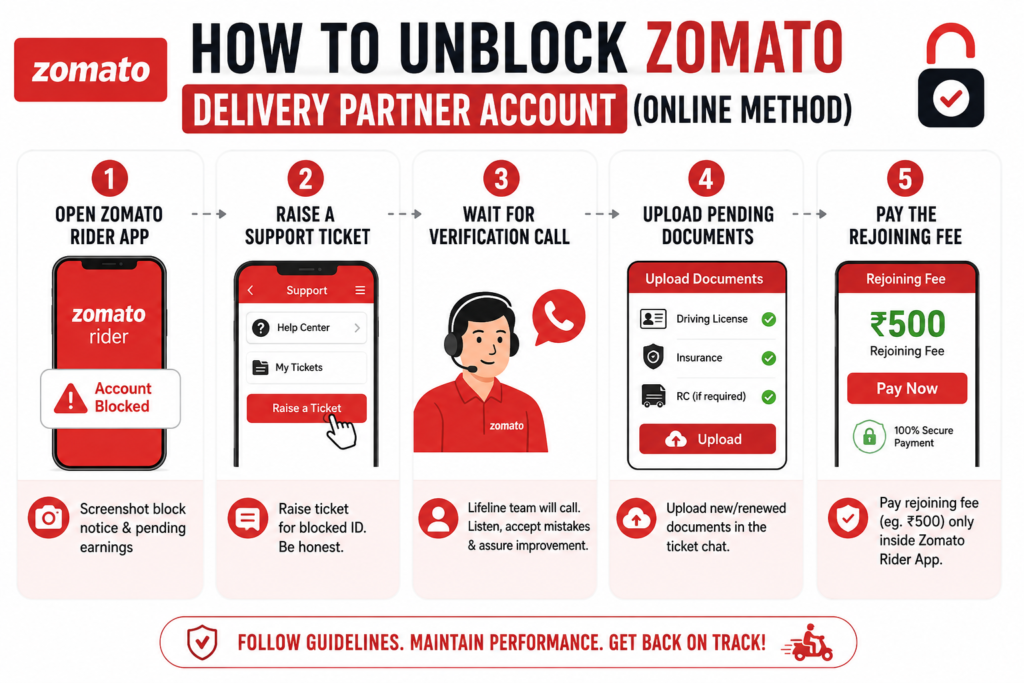
If your account has been blocked due to performance issues (like cancellations) or expired documents, Zomato has an official “Reinstate Process.” Follow these steps carefully through your mobile app:
- Open the Zomato Rider App: Even if you cannot accept new orders, you will usually still have access to the app’s Help or Support section. (Take screenshots of your block notice and any pending earnings immediately).
- Raise a Support Ticket: Go to the ‘Support’ section and raise a ticket regarding your blocked ID. Be completely honest. If you canceled orders due to a genuine emergency, state that politely.
- Wait for the Verification Call: A Zomato support agent (or your Team Leader) will review your ticket. You may receive a call from the “Lifeline” team. Listen to their feedback calmly, acknowledge the mistakes (such as order denials), and assure them that you will follow the guidelines strictly going forward.
- Upload Pending Documents: If the block was due to expired insurance or an expired DL, simply upload the new, renewed documents directly into the ticket chat.
- Pay the Rejoining Fee: If your profile is eligible for reinstatement (usually after a minor performance violation), Zomato may ask you to pay a nominal rejoining fee (e.g., ₹500). Crucial Note: This fee must only be paid directly inside the official Zomato Rider App.
Once the verification is done and the fee is processed, your ID will be reactivated, and you can instantly start receiving orders again.
The Offline Method: Visiting the Zomato Hub
Sometimes, raising an online ticket does not yield a fast response, or the automated system might reject your appeal. If you are wondering how to unblock Zomato delivery partner account when the app support fails, the offline method is your best backup plan.
- Find Your Local Hub: Locate the nearest Zomato onboarding office or physical hub in your city.
- Meet Your Team Leader (TL): Bring your smartphone, your original documents (Aadhaar, PAN, DL, RC), and your Zomato delivery bag.
- Explain Your Case: Speak face-to-face with the Team Leader or Fleet Coach. If your ID was blocked due to a misunderstanding or a minor error, TLs have the internal authority to escalate your case via email and get your account manually reactivated within 24 to 48 hours.
Warning: Beware of Account Unblocking Scams!
When riders get desperate, they often fall into dangerous traps. You will find hundreds of comments on YouTube, Facebook, and WhatsApp from people claiming, “Send me ₹1,000 via UPI and I will unblock your Zomato ID in 10 minutes.”
These are 100% fake scams. No external person, hacker, or social media agent has the power to unblock a Zomato server account. Zomato officials will never send you private WhatsApp payment links. All official rejoining fees are processed securely inside the Zomato app itself. Do not lose your hard-earned money to fraudsters.
What to Do If Your Account Is Permanently Terminated?
If your account was blocked for severe fraud (like stealing food or using fake GPS), Zomato will permanently terminate the ID, and the reinstate process will not work. However, you are still legally entitled to the money for the deliveries you successfully completed before the block.
If your weekly payout is withheld:
- Raise a written ticket asking for the specific policy clause that was violated and demand your pending payout.
- If the support team ignores you, draft a formal email to Zomato’s Grievance Officer. Attach the screenshots of your weekly statements showing the exact amount you are owed.
- As a gig worker, you have the right to escalate unpaid dues to consumer forums or your state’s labor department if the company illegally holds your earned money.
> If you need a fresh delivery opportunity while resolving your blocked ID, submit your details to explore available delivery partner roles in your area.
Frequently Asked Questions (FAQs)
Q1. How long does the Zomato reinstate process take?
If you raise a ticket and speak to your Team Leader, a temporarily blocked account can usually be reactivated within 24 to 48 hours. However, severe violations may take weeks of appealing, or may never be unblocked.
Q2. Can I create a new Zomato account with a different phone number?
No. Zomato tracks your PAN card, Aadhaar card, and Driving License. If your primary documents are blacklisted on one phone number, you cannot simply use a new number to create a fresh account. You must recover your original ID.
Q3. Do I have to pay a penalty to unblock my ID?
For certain performance-related blocks (like high cancellations), Zomato imposes a rejoining fee (usually around ₹500). This must only be paid through the official app interface.
Q4. My ID is blocked because my insurance expired. What do I do?
This is the easiest fix. Simply renew your vehicle insurance, open the Zomato app, upload the new insurance photo in the document section, and your ID will automatically unblock once the system verifies the new date.
Conclusion
A blocked delivery ID can feel like the end of the world, but in most cases, it is just a temporary hurdle. By understanding exactly how to unblock Zomato delivery partner account, you can take immediate, professional action. Always start by raising an official support ticket, be honest about any mistakes you made, and follow up with your local Team Leader if the online process is slow.
Most importantly, protect yourself from online scammers who promise instant unblocking for cash. Follow the official Zomato reinstate process, keep your vehicle documents up to date, and you will be back to earning your weekly payouts in no time!