Noida’s commercial and residential landscape is dominated by two massive centers: Sector 18 (the retail, street food, and entertainment hub anchored by DLF Mall of India) and Sector 62 (the tech and institutional center packed with IT complexes like Logix Cyber Park and Stellar IT Park). Connecting these hubs are dense residential developments in Sector 50, Sector 76, and neighboring Indirapuram.
In this fast-paced environment, 10-minute grocery and daily essential delivery has become a way of life. Blinkit dominates quick-commerce here, but navigating Noida’s wide avenues and high-rise apartments efficiently requires a solid technical foundation. To start earning, you must know how to download, configure, and troubleshoot the Blinkit delivery partner app properly.
Why Sector 18 and Sector 62 Drive High Order Volumes
Noida’s unique urban layout offers significant advantages for quick-commerce delivery partners using the Blinkit app:
- Commercial to Residential Flow: During the morning (7:00 AM – 10:30 AM), orders pour in from family apartments in Sector 50, 76, and Indirapuram for fresh milk, bread, and breakfast items. By noon, order volume shifts smoothly to IT parks in Sector 62 for lunches, coffee, and desk snacks.
- Grid Road Architecture: Noida’s wide, well-numbered roads and signal-free underpasses make navigation far easier than in traditional city centers, allowing you to complete deliveries faster and maintain high app performance scores.
- High Density of Dark Stores: Blinkit operates major fulfillment hubs near Sector 18, Sector 63, and Sector 104, ensuring you are never far from your next pickup.
Technical Guide: Downloads, Login, and App Setup
To ensure you don’t face technical delays during your shifts, follow this detailed breakdown of the app setup process.
Step 1: The Blinkit Rider App Download Process
You will not find the official delivery partner app by doing a standard consumer search on the Play Store under the shopping category.
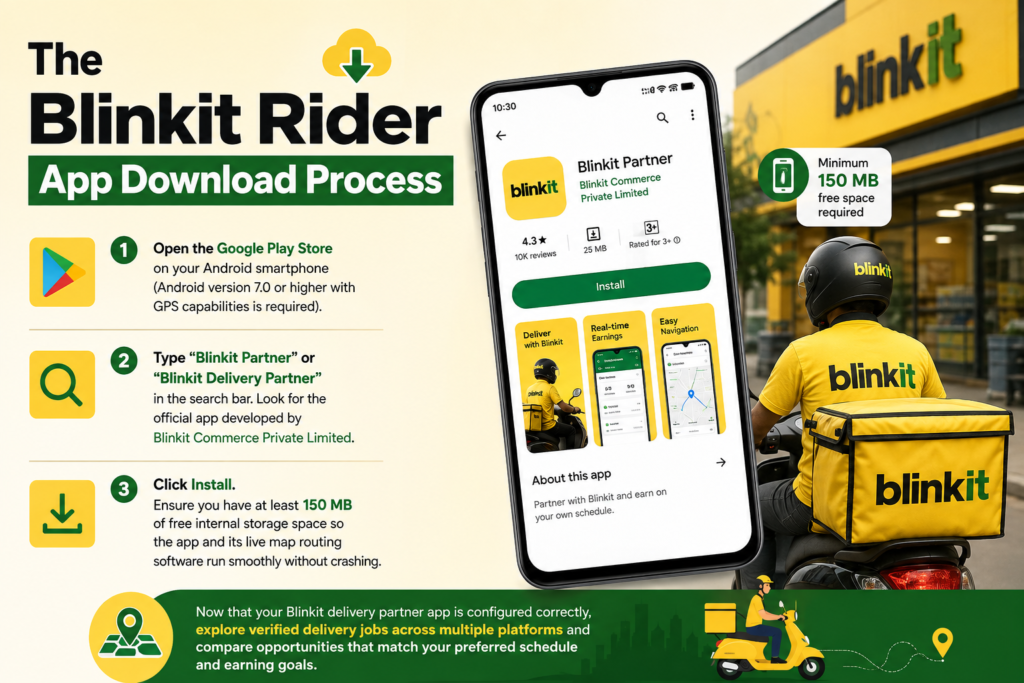
- Open the Google Play Store on your Android smartphone (Android version 7.0 or higher with GPS capabilities is required).
- Type “Blinkit Partner” or “Blinkit Delivery Partner” in the search bar. Look for the official app developed by Blinkit Commerce Private Limited.
- Click Install. Ensure you have at least 150 MB of free internal storage space so the app and its live map routing software run smoothly without crashing.
> Now that your Blinkit delivery partner app is configured correctly, explore verified delivery jobs across multiple platforms and compare opportunities that match your preferred schedule and earning goals.
Step 2: Account Creation & Blinkit Partner Login
Once downloaded, opening the app leads you to the initial account creation screen:
- Mobile Verification: Enter an active mobile number that will stay with you during your shifts. Complete the OTP verification.
- Location Permissions: The app will prompt you for location access. Select “Allow all the time”. This is critical: if you select “Only while using the app,” the app’s algorithm cannot track your live position when your screen is locked, leading to missed order dispatches.
- Document Upload: Upload clear, unblurred photos of your Aadhar Card, PAN Card, Driving License (for petrol bikes), Vehicle RC, and Bank Details (passbook or canceled cheque).
- Blinkit Partner Login: Once your profile is verified by the local Noida operations team (usually within 24 hours), your blinkit partner login turns active. You will use your registered mobile number and an OTP every time you log in to begin a shift.
Step 3: Complete Blinkit App Setup for Maximum Efficiency
Before hitting “Go Online” in Sector 18 or 62, configure these internal settings inside the app:
- Battery Saver Exclusion: Go to your phone’s System Settings -> Battery -> App Battery Saver -> Select “Blinkit Partner App” -> Set to “No Restrictions”. Modern smartphones frequently put background apps to sleep, which will cause you to miss order notifications.
- Map Navigation Default: Open the Blinkit app settings and set your preferred navigation tool to Google Maps.
- Language Selection: The app supports Hindi, English, and regional languages. Set it to the language you read fastest so you can process customer address instructions instantly.
Earnings Reality Check: What Do Noida Blinkit Riders Earn?
Blinkit does not pay a fixed monthly salary. You are compensated per order, supplemented by distance pay, peak surge multipliers, and daily milestone incentives.
1. The Payout Formula
- Base Pay: In Noida, base pay per delivery ranges from ₹25 to ₹40 depending on order size and time of day.
- Distance Pay: For drops extending beyond the 2 km dark store radius (e.g., from a Sector 63 store to Sector 71), distance pay per kilometer applies.
- Rain and Peak Surcharges: Monsoons or extreme summer heat trigger surge bonuses (an extra ₹15 to ₹25 per order).
- Milestone Bonuses: Completing 18 drops in a single daily schedule unlocks target cash bonuses.
2. Daily Gross vs. Net Income Breakdown (10-Hour Shift)
| Financial Metric | Daily Estimate (10-Hour Shift) | Monthly Estimate (26 Days) |
| Gross App Earnings (20–22 Drops) | ₹1,150 | ₹29,900 |
| Fuel Costs (Riding ~90 km/day across Noida) | – ₹270 | – ₹7,020 |
| Bike Servicing & Maintenance Fund | – ₹50 | – ₹1,300 |
| Mobile Data & Refreshments | – ₹40 | – ₹1,040 |
| Actual Net Take-Home Profit | ₹790 / day | ₹20,540 / month |
Working full-time in Noida yields a realistic net monthly income of around ₹20,000 to ₹21,000.
Pro-Tip for Maximum Earnings: To optimize your net earnings, leverage the blinkit app setup features to track “Hotspots.” Before your shift begins, check the map inside the partner app. It highlights dark stores experiencing high order demand in real time. Positioning yourself within 200 meters of a highlighted store in Sector 18 or Sector 62 ensures you receive back-to-back orders without wasting fuel searching for trips.
> Finished setting up the Blinkit delivery partner app? Submit your application online to connect with verified delivery partner openings and start your onboarding process without unnecessary delays.
Frequently Asked Questions (FAQs)
1. What should I do if the blinkit rider app download fails or gets stuck?
Clear your Play Store cache (Settings -> Apps -> Google Play Store -> Clear Cache), ensure you have a stable 4G/5G mobile connection, and verify that your device has sufficient internal storage space.
2. Can I use the same blinkit partner login on two different phones?
No. For security and fraud prevention, your account is bound to a single device at a time. Logging in on a second phone will automatically log you out of the first device and may trigger a security flag requiring selfie verification.
3. How do I update my bank account details in the app?
Open the Blinkit Partner App, go to Profile -> Account Settings -> Bank Details. Upload a new photo of your passbook or canceled cheque. Updates are usually verified within 24 to 48 hours.
Conclusion: Final Thoughts
Mastering the Blinkit delivery partner app is the key to unlocking consistent earnings in Noida’s high-demand markets like Sector 18 and Sector 62. By completing the blinkit rider app download, configuring your phone settings to prevent background app sleeping, and strategically choosing your dark store zones, you can build a reliable, highly profitable daily income stream.

